Schema everything
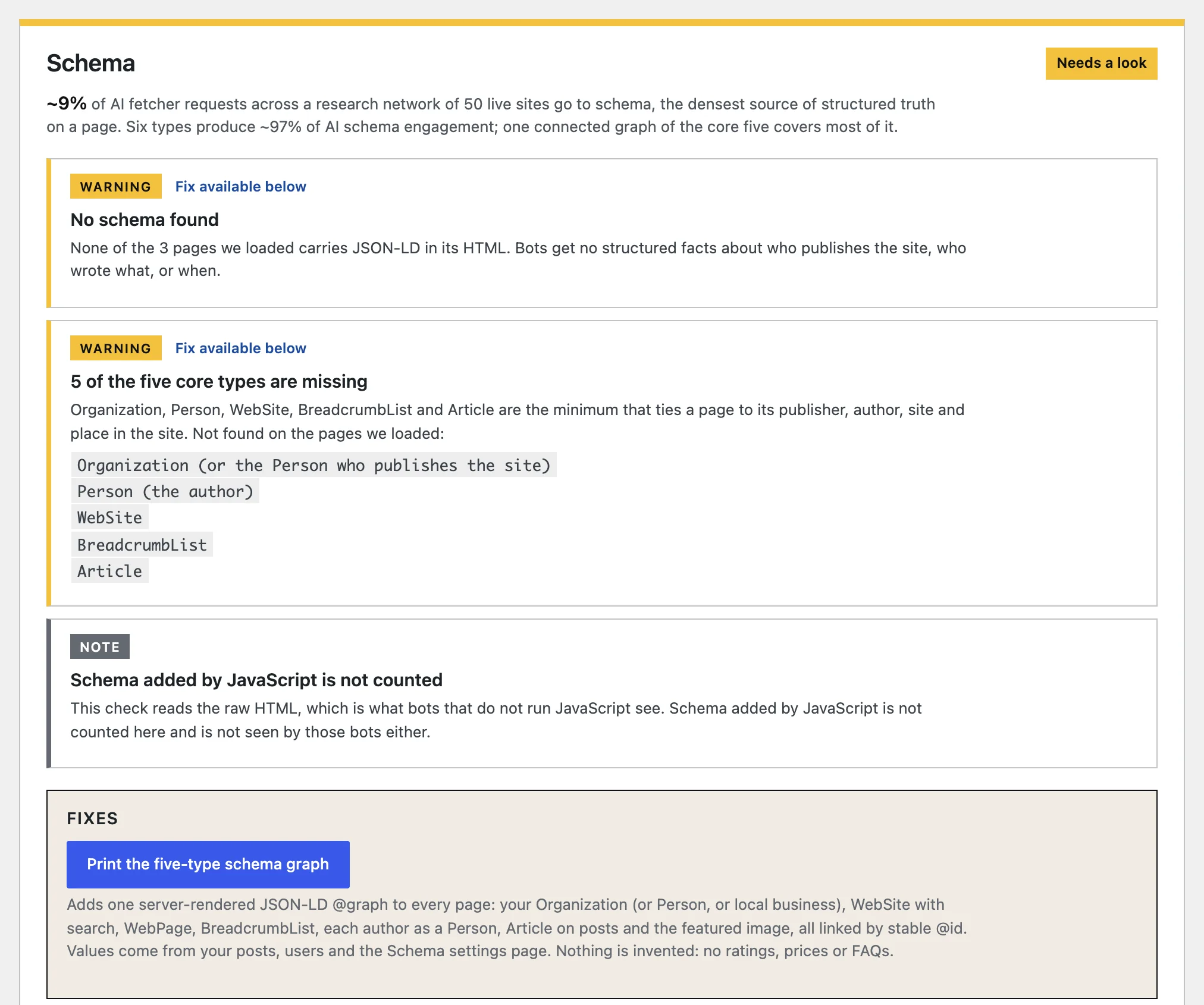
Six types produce about 97% of AI schema engagement. The other 700-plus share the rest.
Free WordPress plugin
Checks and fixes the parts of your site that ChatGPT, Claude, Perplexity and Google's AI answers actually read. Then says plainly what it cannot change.
Free, no account. Twelve checks, one score, and fixes you can undo on the card that made them.
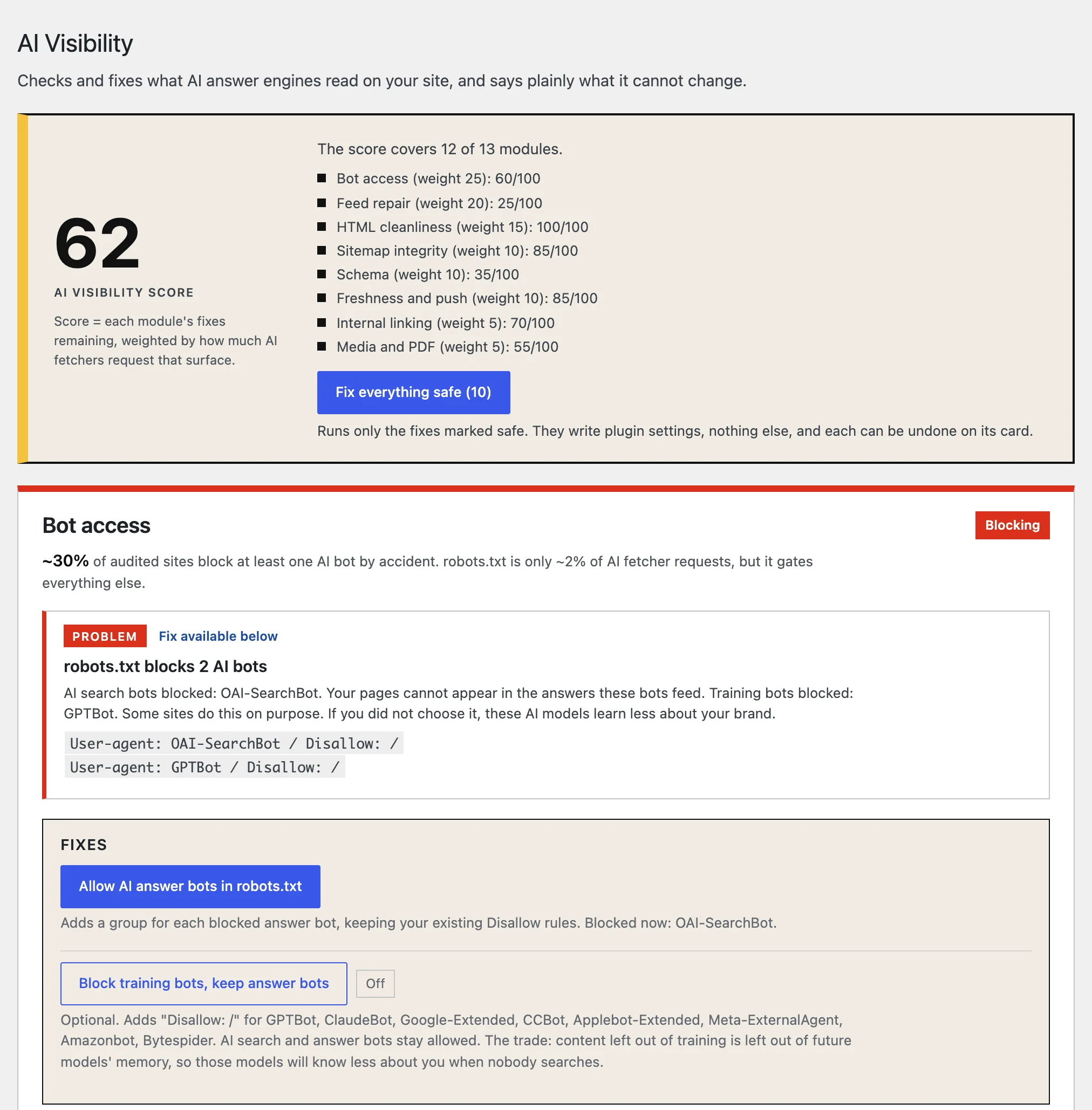
AI fetchers spend most of their requests on the shape of your site before they read a single article. Feeds, plain HTML, sitemaps and schema decide what gets read. On most WordPress sites at least one of them is broken, and nothing in your analytics says so.
of AI fetcher requests go to RSS feeds, the largest single endpoint.
go to HTML pages. Some fetchers never run JavaScript.
go to sitemaps, where bots read your lastmod dates.
requests for llms.txt, from any AI bot, in over 200 days.
Measured across a research network of 50 live sites in nine industries, with every AI bot request logged at the CDN for 200+ days. The plugin weighs each check by these numbers.
Where each AI bot block comes from: robots.txt and who writes it, WordPress settings, .htaccess, security plugin throttles, and firewall or CDN blocks tested from outside. Fix: allow the answer bots, keeping your rules.
Is the feed there, full text, long enough, honestly dated and not served stale by a cache. Fixes: full posts, 50 items, head links, featured images, cache headers.
Loads your newest post as a browser and as GPTBot: is the article text really in the HTML, are snippets capped, is the update date visible. Names the lazy-render plugin when text is missing.
Who serves the sitemap, whether robots.txt points to it, honest lastmod dates, noindex pages left out, images and PDFs listed.
One connected graph or scattered blocks, stable @id values, schema that disagrees with the page, FAQ questions the page never shows. Fix: the five types that matter, printed once, from your real data.
Publishing cadence, posts that went stale, dates that do not add up. Switches: IndexNow on publish, and a "Re-push this URL" link with realistic timelines per engine.
Pages nobody links to, with suggestions for where to link them from, addresses buried too deep, and how much of the site sits within two clicks of the homepage.
Images without alt text, with a field to write it on the card, posts without a featured image, and PDFs nobody links to.
People who clicked through from ChatGPT, Perplexity, Claude, Gemini or Copilot, counted on cached pages too. Stores the assistant, page, day and a count. Nothing personal.
Which bots reached WordPress, which paths and status codes, with impostors marked against the IP ranges each company publishes.
Seven yes-or-no checks per post in the block editor sidebar: answer first, buyer phrases, one topic, author bio, visible update date.
Checked and served if you want one, because it costs nothing. Marked optional and never scored: no AI bot has asked for it.
Each card checks one surface AI fetchers read. The score weighs them by how often those fetchers ask for it, and says how many modules it covers.
Every finding shows the evidence: the setting, the file line or the date that gives it away. No vague "improve your SEO".
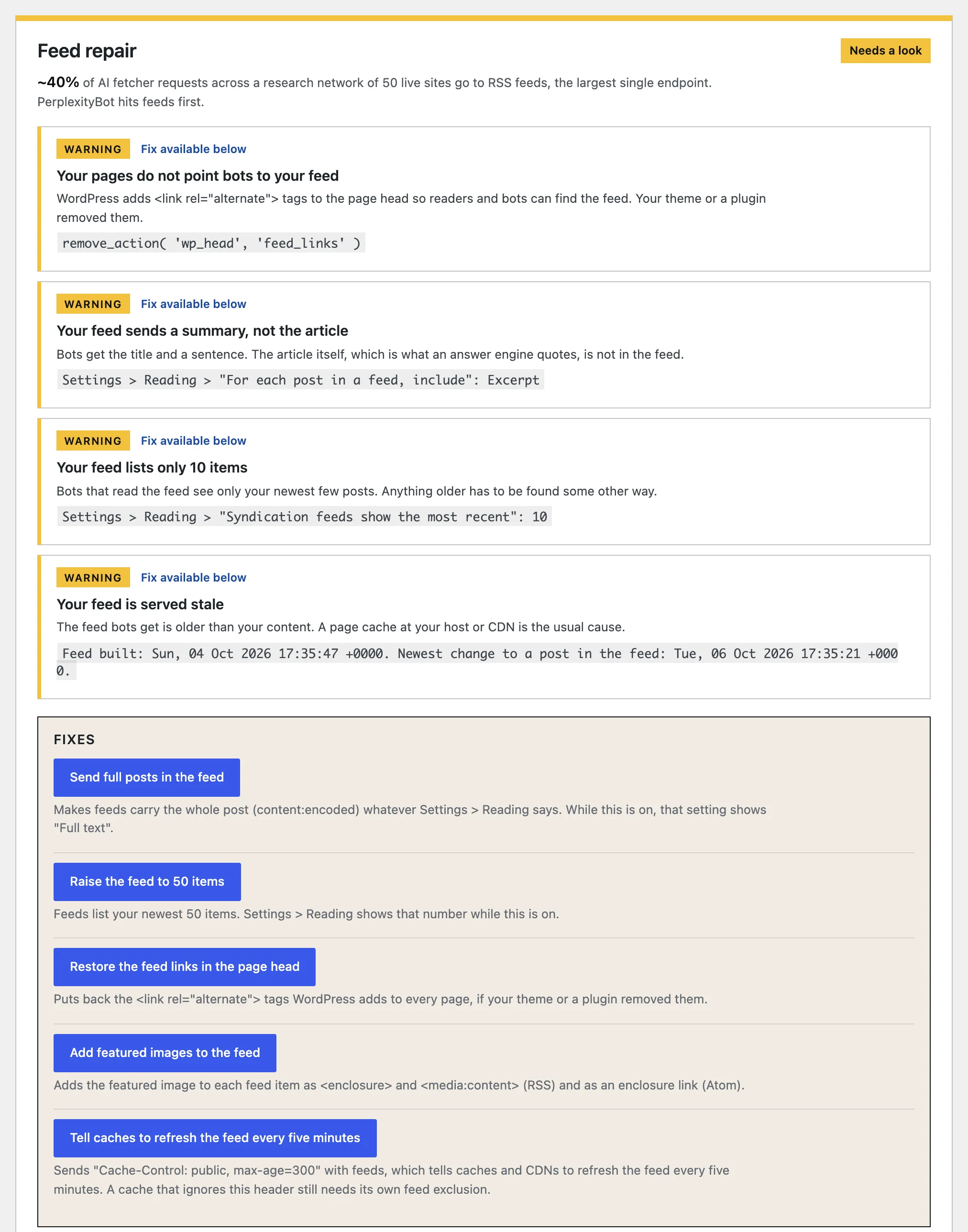
Safe fixes write only the plugin's own settings. Anything that sends data elsewhere is a switch you turn on yourself. The card re-checks so you see the fix took.
Most AI plugins lead with the things that are easiest to sell. This one skips them and shows the number behind each refusal.
Six types produce about 97% of AI schema engagement. The other 700-plus share the rest.
Zero requests from any AI bot in over 200 days of logs. Served if you want it, never scored.
Invented FAQ schema contradicts the page and can suppress citation of all of it.
Google retired the HowTo rich result in 2024. No AI surface in the logs uses Speakable.
Some fetchers never run JavaScript. Schema here is printed in the HTML only.
The plugin measures the conditions for citation. Whether a model cites you is its choice.
All nine refusals, with the reasoning. The llms.txt finding is written up on mishamanko.com: Why llms.txt is dead.
| When | What is sent | To |
|---|---|---|
| You click "Run check" on Bot access | Your site address and a random token, so the outside test can load your homepage as each AI bot | aibotaccesschecker.com |
| Daily, while the bot log is on | Nothing about you. The plugin downloads the IP ranges AI companies publish | OpenAI, Anthropic, Perplexity, Cloudflare |
| On publish, only if you switch it on | The page address | IndexNow, a WebSub hub |
| Never | Visitor IPs, cookies, user agents, or anything about your readers | Anyone |
Everything else runs inside WordPress against your own pages. Full details: Privacy and terms.
Option A
The plugin is on its way to the WordPress plugin directory. Once it is listed, you can install it from Plugins > Add New.
In the plugin directory soonOption B
Download the plugin and upload it to your site. It is the same plugin that goes to the directory.
Free and open source under GPL-2.0 or later. WordPress 6.0+ and PHP 7.4+. No account needed. Changelog
Yes. Every check and every fix is free, with no limits and no account. A paid add-on is planned for citation tracking: whether ChatGPT, Perplexity and Google's AI name your site for the questions your buyers ask. That needs paid data per query, so it cannot be free. The plugin itself stays free.
Two things start on activation: the AI referral counter and the AI bot log. Both store nothing personal and both have an off switch. Nothing else changes until you click a fix, and every fix can be undone on its card.
No. The plugin detects the SEO plugin that writes your robots.txt, serves your sitemap or prints your schema, says "handled by" it, and steps aside. It still audits their output and links to the setting to change. It never prints a second schema graph or a second sitemap. Tested against 45 plugins, including Yoast SEO, Rank Math, All in One SEO, SEOPress, WooCommerce, Wordfence and the main caching plugins.
Your choice, and the plugin offers it as a switch: block training bots, keep the answer bots. The trade is on the card. Content left out of training is left out of future models' memory, so those models know less about you when nobody searches.
It makes citation more likely by fixing what AI fetchers read. It cannot promise a citation, because that is the model's choice. Anyone promising a specific placement is guessing.
Misha Manko, an independent AI visibility researcher who runs a network of 50 live sites logging how AI bots crawl the web. The checks in this plugin are the ones his audits run by hand. Questions: hello@mishamanko.com.